introNetworks

Social Networking Platform for Private Online Communities

  • Home
  • Solutions
    • Software
      • Our Platform
      • Our Components
    • Services
  • Clients
    • Remarkable Clients
    • Case Studies
    • Client Testimonials
  • About
    • Story
    • Leadership
    • Values
  • Contact

How Much are Sales and Marketing Organizations Spending on Big Data – INFOGRAPHIC

June 18, 2013 by Mark Sylvester

According to Lattice’s latest infographic, which comes to us via business2community.com, there are 2.5 quintillion bytes of data created every day.
“The business world is being transformed by Big Data as more and more companies seek actionable insights from the mountains of raw data that are all around us.”
One of the more obvious benefits of implementing an introNetworks business community environment is that you own and control your own user data, and can benefit from it in a direct and immediate way, and we’ve found over the years that customers do not always have a ready action plan for getting the most out of their community data.  Upon meeting with a prospect, we ask this vital question:
“How will you use the business intelligence received from the introNetworks implementation?  What do you want to know about your audiences you don’t know today — and what do they want to know about each other?  How will this knowledge unleash your organization’s potential?”
It’s long been said in the business community that a tool is only as good as its user, and we don’t believe that for a second.  We do believe, however, that your Smart Connections are only as smart as your data strategy, which is why we work to help each of our customers develop a data strategy to meet their long and short term business goals, and our introNetworks Business Community systems are built to deliver on those goals.  Our systems enable our customers to quickly sift through their data in a visual and empowering manner. [Read more…]

Filed Under: Found Articles Tagged With: big data, data visualization, infographic, Smart Connections

Your Data is only as good as what you do with it

June 13, 2013 by Mark Sylvester

Data aging is an issue that we see quite frequently inside of our business communities.  When you’re capturing data from your Professional Community system, how quickly are you able to analyze and act on that data?  Do you have a process in place for reviewing and learning from your data?  It is your data after all, and that’s why you have your own Community system in place instead of using public platforms. Too often, the analysis comes back from the data team a week or two after being pulled, and your insights are longer actionable, or if they are actionable, their potency is dramatically reduced. Read more about it in this article on Big Data by Amanda Reinhart, published on Business2Community.com.  The article leans heavily on information pulled from SAP HANA. Enjoy!
Anymore, we’ve come to take for granted the lifecycle of business data. One system captures the particulars of a sales order, a trouble ticket or countless other information that business professionals need to do their job – only to have to wait while separate analytics systems on separate platforms make sense of the data. It’s just how it’s worked for as long as anyone can remember. Dining on Old Data A recent survey by IDC, in fact, found that over 40% of IT advisers required more than two days to prepare financial data for reporting.[1] Amazingly, the same survey found that “the majority of business users found the slow and fragmented nature of their data systems to be perfectly OK.” [Read more…]

Filed Under: Found Articles, Networking Tips

The Private Social Network: It May Be Just What Your Company Needs

June 10, 2013 by Mark Sylvester

There are many reasons for businesses to utilize private social network systems, rather than trying to fit their efforts into one of the rather limited boxes provided by services such as Twitter, Facebook and Google+, not to mention LinkedIn.  A private, internally-managed social network system allows for better security, better control of user options and behavior, to say nothing of the obvious, though often misunderstood necessity of owning and controlling one’s own data assets! private social network introNetworks knows a thing or two about private social networks, as that’s been our core business for the better part of a decade.  We came across this excellent article on Forbes.com a few days ago.  It was published in October of 2012, but the principals remain true in 2013. Enjoy!
Most of the buzz about social media concerns Twitter, Facebook, LinkedIn and the like, and how they can drive traffic and revenue for consumer brands. That social marketing hubbub is exciting, but it drowns out the quieter but much larger impact private online communities can have on business-to-business firms and their customers. In these intimate online venues, customers and companies can convene to plan and build for the future, collaborating in ways that will never happen in the public eye. [Read more…]

Filed Under: Found Articles, Member Communities

First Time Community Managers

June 6, 2013 by Mark Sylvester

memberNet So you are going to be a Community Manager? Now what? Where do you start? How do you maximize the excitement and energy you have when beginning any new journey? I have been in several sessions the past few weeks with people that know that they need a Community and I’m there to help with the strategy, design, roll-out and what they should expect to invest in time and effort. Of course the question is always asked,
“How much time should we expect to spend managing the Community?” The answer is, “It depends.”
I often use the analogy of designing and planting a new garden. You would not expect it to do well if you never watered or weeded it. You may choose to spend 15 minutes a week, or an hour a day. It depends on how much the garden and it’s beauty means to you. You can think about your online Community in much the same way, you will get out of it what you put in to it. That being said, it’s always good to see what other gardeners are doing, check out the yards in your neighborhood to see what’s working, what’s not, and mirror the best for yourself. So, when I think about where would I go looking for information on best Community Manager practices, of course I go to @TheCR and @RHappe for answers. And within 5 minutes of me tweeting today, I was pointed to several links that I want to share. These are fantastic for first timers and for those that think maybe they could be doing a better job with their existing Community. This was the first link they sent. This is a great deck that Rachel prepared and thankfully, Slideshare makes it easy for me to post it here for you to read:
There were several other links that @TheCR sent in a flurry of tweets after I posted my initial question. You can find more materials about Building Community Strategy here. I love this post called Your Journey as running a robust online Community truly is a journey.
We’d love to hear your thoughts about how you are managing your Community, please leave a comment below. If you’d like help in formulating a Community Strategy and think you are ready to have a conversation, let us know. We’re here to help you as sherpas along your journey.
Thanks again to @RHappe and @TheCR for all of the work they do to help organizations craft and manage their Communities, it really helps all of us.
   

Filed Under: Community Management, Community Tips, Networking Tips

Avoiding Community Manager Burn-out

May 22, 2013 by Mark Sylvester

memberNetOne of the most important people involved in the success of one of our networks is the Community Manager. We pay a lot of attention to them and work closely to make sure the platform helps them be successful. In any profession it is great to have a support community to lean on and to learn from. Community Managers are very fortunate to have the Community Roundtable as a resource. They have recently relaunched their website and it’s even better than ever. You can sign up for their materials and learn a lot. We suggest to all of our clients that they take advantage of this vibrant community. The founders (@JimStorer and @RHappe) are fantastic and passionate about delivering tremendous value, which extends beyond the Community Managers and to the executives who make decisions about implementing social strategies. They are also agnostic about internal or external communities and there’s plenty to learn from commingling the people responsibile for the different types of networks. They just published this great deck for Community Managers that we thought we’d share here. This gets into a lot of the real issues that come up after time and are only now really getting visibility now that many organizations have a few years of experience running communities. We appreciate your comments and encourage you to let us know your thoughts about this fascinating topic.
The Dark Side of Community Management from The Community Roundtable
 

Filed Under: Community Management, Community Tips, Event Communities, Member Communities, Talent Communities

The need for a Visual Matching Engine

May 8, 2013 by Mark Sylvester

In this talk from UCTV to the University of California Santa Barbara Technology Management Program students, CEO Mark Sylvester explains the history of the company, the problem the company set out to solve and how the Visual Matching Engine works in practice.

Filed Under: Member Communities, Networking Tips, Talent Communities, Video

Smart Tags make for Smart Connections

May 1, 2013 by Mark Sylvester

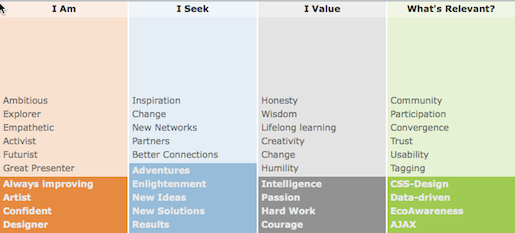
SmartTagsHow tags help make smarter connections

We are all familiar by now with tags and how they are used to help us sort and search out information. We use them to help us find hotels, places to eat, movies to watch or have Netflix recommend films to us. We use tags to help us find better connections, yet there are two fundamental flaws to tags and how they are used. The first flaw is that people actually have to add them to their data. This has been a challenge since the first Content Management Systems were designed. People don’t want to take the extra step, or they are not sure how to tag, or what to name the tag. Problem, problem, problem. The second flaw is that tags are usually on or off. You are either an Action/Adventure movie fan or you are not. There is no value attached to a tag. It’s utility is to aid you in search only. We thought about these two problems when we designed our Visual Matching Engine.

How do we get people to tag themselves, quickly, efficiently and in an engaging manner?

Without smart tags, our matching strategy just wouldn’t work the way we had envisioned it. Getting people to tag themselves turns out to be easy if you give them an interesting, interactive, hands-on way. Make it fun. We have tried various versions of this over time and have found a very easy way to do this. In fact, we turned this into a component that can be easily added to the profile process. Now it’s the best part of creating a profile. People love it.

How do we give tags weight or importance so that they can be ranked to provide better insight?

Giving tags weights was relatively easy technically and the visualization we implemented for users helped them see the rankings at a glance. By interactively moving the most important tags to the top and without having to give an explicit ranking we gave them control which really helped. The flexibility of placement really made a huge difference in engagement. Tags used in this manner are at the core of the introNetworks system. The Visual Matching Engine uses this weighted tag information for search, for pin positioning, for ranking results and even uses it when displaying information that you are likely to be interested in. We constantly find interesting new applications of the technology.

The tag information really is the ‘what’ and the ‘how’ of our smart connections concept. The ‘why’ is so that we can deliver better insight through visualization. That’s the thing we find most interesting.

We’d love to hear your thoughts on this concept and how you have used tags and how you think this approach could be used in other applications. Please leave a comment below. If you are interested in the subject of Tags, there’s a great section on Knowledge Tags on Wikipedia (see here). ps. the tags shown in the image above are an example taken from a TEDx event. Every community we built has a custom set, custom titles and words designed specifically for them.

Filed Under: Networking Tips, Smart Connections

New introNetworks Release Includes Mobile Access

April 19, 2013 by Mark Sylvester

Mobile-iphoneAccess your Smart Connections from anywhere.

If you are a current introNetworks client, you can now login to your site from an iOs device – iPhone or iPad, Android, or Windows Phone 8. You will have access to the two main visualizations, the Pin View and List View, as well as being able to Search for other members based on name, title, organization or doing a more complex tag search, using multiple tags. Background: We leveraged the work we have been doing in HTML5 and Javascript for our Visual Matching Engine. We decided that this was a great new thing to add to our desktop users that find themselves traveling and not able to access the Community. We also integrated  contact capabilities directly into the mobile device. If your site has elected to display email and phone numbers, then these will show up as icons. Pressing one initiates a phone call or an email using the mail system on your device. For our eventNet clients, this makes it very easy for onsite attendees to contact one another without having to find a laptop or computer cafe. For talentNet and memberNet clients, this enables on-the-go access to your peers and colleagues. Video showing the Non-Profit Resource Network using this new mobile capability

Filed Under: News

20 Tips To Make Your Online Community More Engaging

April 16, 2013 by Mark Sylvester

20tips

Want more engagement? Be more engaging.

We are frequently asked how to make the online experience more compelling, more engaging. Here are 20 proven techniques that will work. Not all are applicable to all types of Communities. You will get a sense for what will work and what won’t with your given audience. Pick two or three to start with and experiment. Then add a few more. Please leave us a comment below to tell us which ones you picked.

1. Be a Leader

  • Cultivate pride and identity in each member so they see that they are a part of something bigger than themselves. You set the tone for the Community.
  • Step in and encourage users to interact with each other.

2. Make it easy to participate

  • Use multiple entry points. (email, newsletters, intranet, posters)
  • Make the Community a regular part of your normal communications.

3. Welcome and Encourage Newbies

  • Ensure that new members are welcomed and feel acclimated to the new community. One to one contact from the Community Manager is a fantastic way of building good foundations. Thank your members for performing actions, suggest content they might like or point them towards new activities in order to build long-term engagement.
  • Create a Welcome Wagon group that reaches out to new members, including a tutorial movie (Jing) on how to get the most out of their interactions.
  • Make sure that the purpose of the Community is clearly articulated for every new member.
  • Be very clear about how members can engage and encourage them to start posting and making connections early in the process.
  • Post a tutorial on how a complete profile helps them get the most out of the Community.
  • Have an Ambassador in charge of highlighting or interviewing new members weekly, then posting highlights in the Dashboard Digest.

4. Create a “water cooler” environment in new communities

  • Make your online community a place where people can go to engage in light-hearted conversation with their peers in a non-threatening way. This is an important way for members to establish a comfort level with each other before broaching more sensitive topics. Idle chit chat is an important part of a community and it will take some creative influence to help executives understand that it is a crucial facet of the business case.

5. Interact with your Community

  • Interacting lets members know that someone is listening. Make comments in Forums and frequent interactions with Group creators.

6. Post inspiring content

  • You created the Community with a business objective in mind and have effectively communicated that purpose to the membership. Your choice in content posts should echo and support those objectives so that the Community reflects it’s purpose and has continuity with your brand identity.
  • Set a goal to publish or upload at least 2 new pieces of content a week.

7. Ask questions that matter to the community

  • Asking questions using actionable language is recognized as a good way of generating discussion. However, this only works if the questions you ask are relevant to your audience. Take the time to understand what your audience reacts to and then plan around this.
  • Make the questions structured, i.e. Do you agree or disagree?
  • Make sure you follow up and acknowledge them when they answer the question.

8. Identify and nurture your power users

  • Getting together with them as equals and co-conspirators helps bring more volunteers into the fold, because you give them a vested interest in the success of the Community.
  • Solicit the Top Posters to moderate a monthly ‘Great Debate’ on a specific topic that they are expert in. (Use Manage to find this information out.)
  • Interview the Community Experts. (Use Advanced Search to find them.) Having them actively involved will build engagement and encourage other experts to ask to be interviewed when they see the recognition it gains.

9. Showcase and cross promote UGC (User generated content)

  • Be clear on the purpose and desired response to posted content and conversations – it will help members know what is appropriate and feel comfortable contributing. Clarity of purpose will also help you track and measure results effectively.
  • Remind people that they can subscribe to a Forum thread so they don’t have to check back in when new posts are made.
  • One of the best ways to pull people into a conversation is to let them know that they have an audience. Encourage peers to respond to new content that is posted, particularly if a newer member of the community posts it. Responding as the community manager is OK but it is not as satisfying as a peer response and it can inadvertently halt the discussion because it is viewed as the opinion of an authority figure.
  • Curating and showcasing community content energizes and motivates users and can help get new content contributors.
  • Feature a Member a Month based on interesting content they’ve posted.
  • Post Top Commenters/Posters in the Dashboard Digest or Company Newsletter or other regular communications.

10. Encourage posting of images showing the Organization in Action

  • Create a Resource area for photos from around the Organization.
  • Monitor most active and give rewards to groups that are most active.

11. Be timely about reviewing UGC 

  • Make sure you review and comment if needed on Forums and Resources.

12. Reward contributors

  • Create a metric that combines posts, group membership, logins, aggregated time spent online into a score and give a monthly prize.
  • Run a contest with a random drawing from all posters to a specific Discussion with a great prize. (something from Apple?) When tied to one of the content strategies above, this works at stimulating meaningful interaction.

13. Encourage Robust Profiles

  • Regularly review the Most Aligned and Least Aligned reports. (Via Manage)
  • Contact Least Aligned monthly to urge them to be more involved.

14. Contextualize the data from the backend reports section of the Community

  • Take a look at the Word Selection reports and consider creating Groups or Forum posts that take advantage of this information.
  • If you had a group of words: I Need Help With, and I Can Help With, you could easily find the experts who could provide help and solicit their support in a Discussion campaign.
  • If you see that Movies are a top interest, create a Movie Lovers Group or a general discussion thread that anyone could contribute to (so they didn’t have to join the group to see what is going on).
  • Instead of just reporting on statistics you find in Manage, try to draw conclusions that help your users.
  • If you find that 18% of your users say they are Entrepreneurial, use that information to find a way to tap into that resource. See if you can harness that energy in Team Building or New Product Development. Be creative with the information you glean from the network.

15. Use the Marketplace for Promotion

  • Create at least ten graphically rich house ads to announce events, special classes or programs. Change them out often to avoid staleness.
  • Be aware of the branding and visual nature of these ads and make them engaging.

16. Get more out of Groups

  • Create a ‘Getting Started with Groups’ post that highlights best practices.
  • Create logical categories for Groups that support your business objectives.
  • Talk with Group managers, be cordial and lay out guidelines.
  • Regularly check to guard the quality of the Groups that are created. Help them when you see there’s only one person in the group, them.

17. Create an Ambassador Group that meets regularly

  • Having a group of interested people who can provide ideas, help promote engagement, and do things like serve as a Guest Editor, and soliciting stories can be a valuable resource to the Community Manager.

18. Create RSS feeds in Online Resources that are applicable to your Community

  • Be the first to publish information on industry and related topics.
    • Example of an RSS Feed from a Cartographic Blog:
      • http://feeds2.feedburner.com/IcaWebsiteNewsFeed
    • Here’s how you would return Twitter feeds for Mark Sylvester:
      • http://api.twitter.com/1/statuses/user_timeline.rss?screen_name=marksylvester
    • Here’s how you would return Twitter search results for Community Managers, where the tweets also included links to posted content:
      • http://search.twitter.com/search.atom?q=+”community”managers”+%3A%29+filter%3Alinks
    • If you are good at building HTTP strings you can look at this resource to learn more about Twitter:
      • https://dev.twitter.com/docs/api/1/get/search

19. Use the Dashboard Digest weekly email feature strategically

  • Pick a day and time that works best for it to be well received by your members.
  • Feature Community updates, current conversations to pay attention too, Top Users, Interesting Stories, etc.
  • Make sure that it’s easy to contact the Community Manager with ideas to improve the Community.

20. Create an area for Continuing Education and Ideas related to Community

  • Use this as an avenue to improve the organizations’ use of the Community while maximizing their ability to Connect, Communicate and Collaborate. Solicit stories, examples, links and ideas that help everyone.
    • How to make great connections
    • How to write compelling communications
    • How to collaborate effectively

21. BONUS Solicit anecdotes about Connections or Collaborations

  • Look for stories that are a direct result of use of the Community and highlight them on a regular basis in your Communications.
There are a lot of ideas here. We suggest that you pick a few and implement them and measure the impact. Set a schedule and do a little bit each day so you are not feeling overwhelmed with tasks related to managing the Community. Create a calendar of events at least three months out so you can easily measure your activities and see progress. Note: Concepts assembled from direct experience with introNetworks’ clients over ten years, the Community Manager Roundtable, Leah Bettancourt (Mashable), Angela Conner (18 Rules of Community Engagement), Dan Harris (Fresh Networks), Ian Jukes (21st Century Fluency Project), Online Communities: what works and what doesn’t – Bart De Waele.

Filed Under: Community Tips, Member Communities, Networking Tips, Talent Communities

Data Driven Decisions

April 10, 2013 by Mark Sylvester

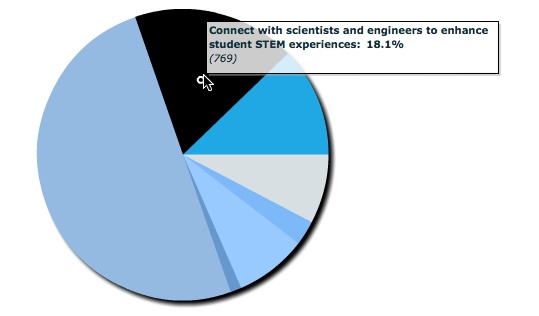
Data Graphic from the introNetwork System We are used to looking at charts and graphs and deriving meaning from them. I would suggest that we should be thinking about how these charts and graphs can be used to help us in making smarter decisions and not just eye-candy. When we build a Community, we are helping users make smarter connections with each other because the connections are data-driven. The tags selected in their profile are matched to others that result in a ‘smart’ connection for them to make. So this is obviously of great value to the individual user and happens without them having to really do anything except build a robust profile. However, when we are helping a client with the initial site design, we always ask the question;
What do you want to know about your audience that you do not know today? Once you know the answer, what are you going to do about it to improve your organization?
We call this Actionable Business Intelligence. Which means they don’t ask a question in the Profile  that they don’t already have a plan for what they will do with the answer. This is data driven decision making. Makes sense, right? This is one of the most challenging aspects of the design phase. People don’t know what they don’t know and they don’t know how to ask the right question. It’s a conundrum to be sure. That’s why we are glad we have kept hundreds of these types of questions from sites previously built to help clients during the brainstorming of a new community design. We love this quote and repeat it often
If you want better answers, ask better questions – Tony Robbins
We apply this by suggesting to clients, If you want to make better decisions, ask better questions and let the answers drive your decisions. Here are three examples of how you might make data driven decisions:
  • You are designing an educational program and want to make sure you apply your limited time and resources to creating the most needed courses. If you had asked a question such as: Areas I need help. Then you could easily look at the answers to the question and quickly find the top five items you should focus on, rather than guessing.
  • You are putting together a task force to investigate an industry challenge. If you have asked the question: Biggest challenge facing our industry today, you may find that 79 people had said: Government Regulations. You could then invite the  79 people to seed your group instantly.
  • You are wanting to best understand the motivation for people joining your community. By asking the question: What do you expect from this Community (see image above from the NEON site), you would have the range of answers and be able to enlist others based on this knowledge.
It’s not hard. But it does take some future thinking on your part. It also removes the anecdotal aspect from the decision, by being data driven, you have more certainty that you are working with the right people, which will help you be more successful. Would love to hear your point of view on this, please feel free to leave a comment below.

Filed Under: Business Development, Community Tips, Smart Connections

  • « Previous Page
  • 1
  • 2
  • 3
  • 4
  • 5
  • Next Page »

Privacy Policy - Terms of Use

introNetworks, Inc – Santa Barbara, California – All Content ©2025 – All Rights Reserved